Start on your Mac
Point Casto to your music folder and let it organize the library you already own.
 This is Casto.
Casto makes it effortless for Apple ecosystem users to self-host, play, and stream your personal MP3 and FLAC library from your Mac to the web, with an iOS app in development.
iOS APP IN DEVELOPMENT
Self-hosted. Simple. Free.
For Macs running macOS 14 Sonoma or newer.

One library. Every screen.
Casto starts with the music on your Mac, then carries that same familiar library into the web app and the upcoming iOS experience.

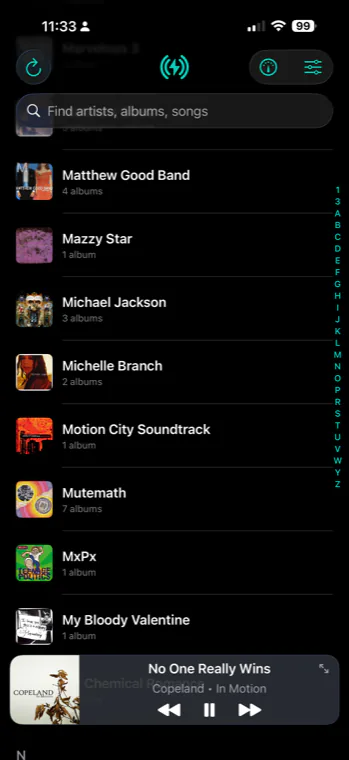
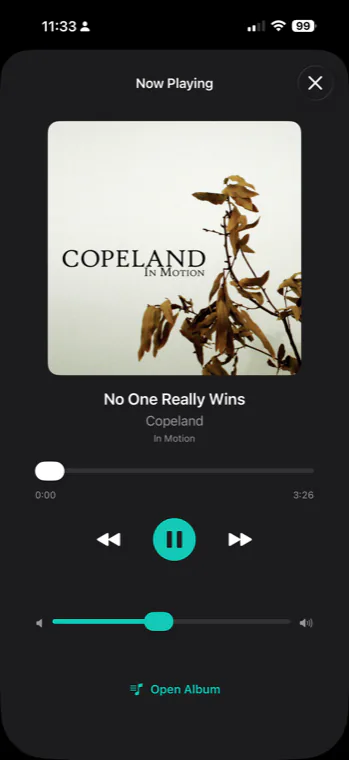
Point Casto to your music folder and let it organize the library you already own.
Open any modern browser to browse, search, rediscover, and stream your collection.
The Casto iOS app is in development, bringing your personal library along for the ride.
Use the MP3 and FLAC files you already own.
Point Casto to your music folder and it handles the rest.
Casto sorts your collection by artist and album automatically.
Listen to your library directly in the Casto app on your Mac.
Your library stays yours, with no platform lock-in.
Access your music anytime through Casto’s dedicated web app in any web browser on any computer.
Recently Added, Recently Played, and Rediscovery shelves help surface new music, recent listens, and forgotten favorites.
Create album Tags and song Playlists on your Mac, then browse and play them from the web app.
See connection status, active listeners, scan details, and library health from the Mac and web dashboards.
Artist and album details are pulled in to keep your library polished.
Easily edit metadata manually at the artist, album, or track level whenever you need to fine-tune your library.
Clean up missing details, improve album artwork, and keep your library feeling organized.
Invite friends and family to stream your library from anywhere using the web app—your music stays on your server.
Take your library on the go with the upcoming Casto iOS app currently in development.
There are already some great media server options out there, including Jellyfin, Plex, and open-source projects like Navidrome. Casto isn't meant to compete with them or replace them.
Casto started as a hobby project to solve a problem I had myself. As someone who lives in the Apple ecosystem, I wanted a simple way to stream the music I already own—without subscriptions, platform lock-in, or a lengthy setup process.
Projects like Navidrome are powerful and flexible, but Casto takes a different approach. It's built specifically for Mac users who want to get up and running quickly. Install it, point it at your music library, and start listening from wherever you are.
That's really the entire idea behind Casto: a simple, Apple-friendly way to enjoy your personal music collection.
Yes. Use it and enjoy it!
They're all great products, and Casto isn't meant to compete with them.
Plex offers a polished experience, but it ties you closely to the Plex ecosystem. Jellyfin is fantastic for video streaming (I personally use it for my own media server), but I've never loved the audio experience. Navidrome is excellent as well, but setting it up for secure access outside your home network can be intimidating for less technical users.
Casto exists because I wanted something different: a simple, Mac-focused music streaming solution that feels at home in the Apple ecosystem and is easy to set up, use, and share.
Getting started is quick and easy:
1. Install Casto on your Mac and open the app.
2. Point Casto to your music library folder.
3. Let Casto scan and organize your library.
4. Start listening in the Mac app or through the Casto web app.
When you're ready to share, open Preferences in Casto, copy your web sharing URL, and send it to friends or family. They can stream your library right from their browser.
Absolutely.
Just copy the sharing link from the Preferences panel and send it to whoever you'd like. They'll be able to stream your library right from their browser—no complicated setup required.
Casto currently supports MP3, M4A, AAC, FLAC, WAV, and AIFF audio files.
If your music library contains a mix of formats, Casto will scan and organize them automatically. Support for additional formats may be added over time as the project evolves.
For most users, internet connection quality is the biggest factor in streaming performance, especially when listening away from home.
File size and quality matter too. High-bitrate or lossless files (like FLAC, WAV, and AIFF) carry more data, which can require more bandwidth and more work to transcode for smooth playback over the web.
In short: faster, more stable internet and appropriately sized source files generally deliver the best Casto streaming experience.
Please do!
Casto is a hobby project built by one person who simply wanted a music streaming solution that worked the way he thought it should. Because of that, user feedback plays a huge role in shaping what gets improved and what features get added next.
Whether you've found a bug, have an idea for a new feature, or just want to share your thoughts, I'd love to hear from you. Every bit of feedback helps make Casto better.